

Standard CI checks can confirm that application code builds and passes deterministic tests, but they cannot detect when prompt, model, retrieval, or tool changes reduce LLM output quality. Running a Braintrust evaluation suite in GitHub Actions adds an LLM quality check to every pull request and fails the check when results fall below defined thresholds.
This guide covers the eval file, GitHub Actions workflow, baseline experiment, and threshold policy required to build the evaluation pipeline in Braintrust. It also explains how to keep pull request runs fast, account for non-deterministic outputs, and investigate regressions through stored experiments and traces.
LLM regressions that standard CI misses
A pull request can change an AI application's behavior without breaking a conventional code contract. Replacing a model, editing a system prompt, adjusting retrieval settings, or rewriting a tool description may reduce output quality even when the linter, type checker, and unit tests all pass. Because standard CI verifies code structure and deterministic behavior, a well-formed but lower-quality model response can reach production without triggering a failure.
LLM evaluation adds the behavioral checks that standard CI lacks, helping teams detect regressions during development instead of discovering them through user feedback or production metrics.
Non-deterministic output breaks exact-match assertions
Traditional tests assume a fixed relationship between input and output. Exact-match assertions remain useful for deterministic code surrounding an LLM, but model-driven behavior can produce several acceptable responses or tool sequences for the same request. Requiring one exact result would incorrectly fail valid variations.
Evals handle the spread of acceptable answers by measuring each result against defined criteria. In Braintrust, scorers assign values between 0 and 1, thresholds define acceptable performance, and repeated trials show how consistently the application meets those criteria. CI can therefore score model behavior on a scale, so a differently worded but correct answer still passes.
Quality failures still produce valid output
A unit test can detect when a function returns the wrong type or violates a fixed contract. A prompt change that makes answers less grounded may still return a correctly formatted string, so type and schema checks pass even as response quality declines. Scorers give CI measurable requirements for properties such as correctness, relevance, and safety, allowing the pull request check to detect failures that conventional tests cannot.
The four testing layers covered in how to test AI agents include single-step evaluations, trajectory evaluations, CI regression suites, and production monitoring. The GitHub Actions pipeline described in this guide belongs to the CI regression layer, where an eval file, workflow file, and threshold policy determine whether an AI change meets release requirements.
Pipeline prerequisites
Four requirements should be in place before the first workflow run.
A Braintrust account and API key: Create a Braintrust account, then generate an API key under Settings > API keys in the Braintrust app. Add the key to the GitHub repository as a secret named BRAINTRUST_API_KEY so the workflow can access it without exposing the value in the workflow file.
Model provider credentials: The evaluation task calls a model, so the run needs credentials for the selected provider. With the GitHub action's defaults, OpenAI calls route through the Braintrust proxy on your Braintrust key, so the provider key lives in your Braintrust organization or project rather than in a repository secret. Calling a provider directly, or calling one other than OpenAI, requires a repository secret mapped into the step, as covered under API keys and repository secrets.
The Braintrust SDK, scorer library, and bt CLI: The evaluation quickstart uses the Braintrust SDK, OpenAI SDK, autoevals library, and ts-node for its TypeScript example. Install them with the commands provided in the quickstart:
# pnpm
pnpm add braintrust openai autoevals ts-node

# npm
npm install braintrust openai autoevals ts-node

# Install the bt CLI (macOS and Linux)
curl -fsSL https://bt.dev/cli/install.sh | sh
A supported runtime on the runner: Set the action's runtime input to node, python, or go to match the project. Braintrust Eval Action v2 runs on Node 24, so self-hosted runners must support Node 24-based actions before they can run the Braintrust GitHub Actions workflow.
The examples below follow the Node and TypeScript path from setup through evaluation. Python and Go projects use the same pipeline structure with their language-specific installation commands and the corresponding runtime input. The evaluation quickstart also provides equivalent eval examples for TypeScript, Python, Go, Ruby, Java, and C#.
Eval suite components: dataset, task, and scorers
Every Braintrust evaluation combines data containing the test cases and expected outputs, a task representing the AI function under test, and scores that measure the quality of its results. The Eval() function connects those components in a file that bt eval can run without interactive input. The Braintrust eval guide connects all three parts in a task that identifies movies from plot descriptions.
const client = new OpenAI();

Eval("Evaluation quickstart", {
  experimentName: "Movie matcher (TypeScript)",
  // Data: Test cases with inputs and expected outputs
  data: [
    {
      input:
        "A detective investigates a series of murders based on the seven deadly sins.",
      expected: "Se7en",
    },
    {
      input:
        "A thief who steals corporate secrets through the use of dream-sharing technology is given the inverse task of planting an idea into the mind of a C.E.O.",
      expected: "Inception",
    },
    {
      input:
        "A computer hacker learns from mysterious rebels about the true nature of his reality and his role in the war against its controllers.",
      expected: "The Matrix",
    },
    {
      input:
        "A cowboy doll is profoundly threatened and jealous when a new spaceman figure supplants him as top toy in a boy's room.",
      expected: "Toy Story",
    },
    {
      input:
        "An orphaned boy discovers he's a wizard on his 11th birthday when Hagrid escorts him to magic-teaching Hogwarts School.",
      expected: "Harry Potter and the Sorcerer's Stone",
    },
  ],
  // Task: The function being evaluated
  task: async (input) => {
    const response = await client.responses.create({
      model: "gpt-5-mini",
      input: [
        {
          role: "system",
          content: "Based on the following description, identify the movie.",
        },
        { role: "user", content: input },
      ],
    });
    return response.output_text;
  },
  // Scores: Metrics to measure quality
  scores: [ExactMatch],
});
Run the evaluation with:
bt eval movie-matcher.eval.ts
Braintrust stores the result as an experiment, preserving the inputs, outputs, scores, and metadata for comparison with later runs. Replace the inline examples with cases from your application, point the task at the application code being evaluated, and select scorers that represent its failure modes. The guide to running experiments in code covers the full set of SDK options.
Representative datasets: Inline test cases work for the initial evaluation, but a merge gate needs a consistent dataset that remains comparable across pull requests. Braintrust datasets are versioned collections built from production logs, user feedback, manual curation, or data generated using Loop. Each record requires an input that recreates the test case and can also include an expected output, metadata for filtering and grouping, and tags for organization.
Passing a stored dataset directly to Eval() ensures that pull request and post-merge runs use the same cases. Dataset versioning also keeps an experiment associated with the exact test data used for the run. Braintrust's guide to using datasets in evaluations provides the syntax for each supported language and explains how to load dataset versions assigned to specific environments.
For a merge gate, dataset coverage should reflect the behaviors that determine whether a release is acceptable. Include common user goals, known boundary conditions, adversarial inputs, off-topic requests the application should decline, and confirmed production failures that must not recur.
Task functions: The task should call the same application code path used in production. A thin wrapper around the application entry point keeps the evaluation tied to the implementation under review. Reimplementing the prompt inside the eval file can leave the test passing after the production prompt changes, preventing the pipeline from measuring the actual pull request.
Quality scorers: Use deterministic scorers for requirements with a clear result, such as exact matches, schema validation, or tool ordering. LLM-as-a-judge scorers can assess open-ended qualities such as groundedness, tone, and instruction following. Keep safety requirements in separate scorers so the threshold policy can evaluate them independently from general response quality.
Non-interactive execution: The bt eval CLI must run without prompts and return machine-readable output in CI.
BRAINTRUST_API_KEY=$BRAINTRUST_API_KEY bt eval evals/ --no-input --json
Replace evals/ with the directory containing the project's eval files. The --no-input flag suppresses prompts, and --json returns machine-readable results. If an eval throws an exception, bt eval returns a non-zero exit code that fails the workflow job. The threshold policy covered later extends that behavior to quality regressions that complete without throwing an exception.
GitHub Actions workflow configuration
With the eval file stored in the repository, a GitHub Actions workflow can run it for every pull request targeting the main branch. The following configuration checks out the repository, sets up Node.js, installs project dependencies, and runs the Braintrust eval action.
name: Run evaluations

on:
  pull_request:
    branches: [main]

permissions:
  pull-requests: write
  contents: read

jobs:
  evaluate:
    runs-on: ubuntu-latest
    steps:
      - uses: actions/checkout@v4
      - name: Set up Node.js
        uses: actions/setup-node@v4
        with:
          node-version: 24
      - name: Install dependencies
        run: npm install
      - name: Run evals
        uses: braintrustdata/eval-action@v2
        with:
          api_key: ${{ secrets.BRAINTRUST_API_KEY }}
          runtime: node
Triggers and permissions
The pull_request trigger runs the workflow whenever a pull request targets main. For an expensive evaluation suite, add a paths filter so the job runs only when relevant prompt files, application code, or eval files change.
The workflow grants contents: read permission to check out the repository and pull-requests: write permission to post evaluation results on the pull request. Without write access to pull requests, the GitHub action can run the evals but cannot create or update the results comment.
Runtime and dependency setup
The runner must prepare the project before the GitHub action executes its eval files. In the Node workflow above, actions/checkout retrieves the code, actions/setup-node configures Node 24, and npm install installs the dependencies.
Set the action's runtime input to node, python, or go according to the project. When the GitHub action needs an explicit package manager, set package_manager to the tool the repository already uses.
API keys and repository secrets
Store BRAINTRUST_API_KEY as a GitHub repository secret and pass it through the action's api_key input.
Model provider credentials work differently, and the default behavior surprises people. The action exports three environment variables into the eval process before running it. It sets BRAINTRUST_API_KEY from the api_key input. It sets OPENAI_API_KEY to that same Braintrust key, but only when the environment does not already carry one. And when use_proxy is on, which is the default, it sets OPENAI_BASE_URL to the Braintrust proxy.
The consequence is that a client built with new OpenAI() picks up both variables and routes through the proxy on the Braintrust key. The workflow above therefore runs without an OpenAI secret, provided your provider keys are configured in Braintrust at the organization or project level. When they are not, the run fails at the proxy rather than at the client.
Map the secret yourself in two cases. The first is calling OpenAI directly, by setting use_proxy: false or by preferring your own key. Because the action only sets OPENAI_API_KEY when one is absent, an explicit mapping takes precedence:
      - name: Run evals
        uses: braintrustdata/eval-action@v2
        with:
          api_key: ${{ secrets.BRAINTRUST_API_KEY }}
          runtime: node
          use_proxy: false
        env:
          OPENAI_API_KEY: ${{ secrets.OPENAI_API_KEY }}
The second is any provider that is not OpenAI. The action sets no Anthropic, Google, or other provider variables, so an eval calling those SDKs needs its own env: entry, such as ANTHROPIC_API_KEY or GOOGLE_API_KEY, since GitHub does not expose repository secrets to a step automatically.
Do not place either credential directly in the workflow file or commit it elsewhere in the repository.
Action inputs
The Braintrust eval action supports the following inputs:
| Input | What it controls |
|---|---|
api_key | Required Braintrust API key supplied from a repository secret |
runtime | Required evaluation runtime: node, python, or go |
root | Root directory containing the eval project; defaults to . |
paths | Paths or glob patterns relative to root that identify the evals to run; defaults to . |
package_manager | npm or pnpm for Node, pip or uv for Python, or go for Go |
use_proxy | Routes supported model calls through the Braintrust proxy, which can cache LLM calls; defaults to true |
terminate_on_failure | Stops the evaluation process when an error occurs; defaults to false and is ignored for Go evals |
report_scores | Limits the pull request comment to specified score names; defaults to all scores |
report_metrics | Limits the pull request comment to specified metric names; defaults to all metrics |
github_token | GitHub token used to create or update pull request comments; defaults to ${{ github.token }} |
step_key | Internal key identifying the step; defaults to ${{ github.workflow_ref }}-${{ github.action }} and should be left alone |
For a monorepo, use root to identify the package containing the eval project and paths to select its eval files. These inputs let one workflow run the correct evaluation suite without reorganizing the repository.
CLI alternative for other CI systems
For GitLab, Jenkins, CircleCI, or another CI system, run evaluations directly with the bt eval CLI. The CLI runs the same eval files and returns a process exit code the CI system can use, but it does not automatically provide the GitHub-specific pull request comment. Use the selected CI system's reporting features when you need equivalent merge-request feedback.
BRAINTRUST_API_KEY=$BRAINTRUST_API_KEY bt eval evals/ --no-input --json
Baseline comparison and pull request reporting
A factuality score of 0.86 does not show whether a pull request improved or reduced application quality. Comparing the current run with a known-good experiment provides the context needed to interpret the score and decide whether the change is ready to merge.
Selecting the baseline experiment
A baseline is the experiment used as the reference for the current run. Setting a persistent baseline keeps comparisons consistent across pull requests and prevents reviewers from selecting a different reference each time they open an experiment. Set the baseline through the Comparisons selector or configure a project-wide default that applies across the project.
If no baseline is configured, Braintrust selects the most recent experiment from the same Git branch when the experiments include Git metadata. Set an explicit baseline when the most recent run on main is an experiment you haven't accepted, such as a spike or a partially reverted change.
Teams that initialize experiments through the SDK can also specify a baseline by name or ID, or select one dynamically with a BTQL query. Dynamic selection should filter by both branch and dataset so the pipeline does not compare experiments that used different test cases. The guide to comparing experiments covers UI, SDK, and CI configuration.
Reading the pull request comment
The Braintrust eval action creates or updates one comment on the pull request with improvements and regressions relative to the selected baseline. The comment includes score and metric summaries and links to the complete experiment in Braintrust.
A typical comment uses the following structure:
| Result | Average | Improvements | Regressions |
|---|---|---|---|
| Levenshtein score | 83% (+3pp) | 8 🟢 | 4 🔴 |
| Duration metric | 1s (0s) | 16 🟢 | 1 🔴 |
The average shows the aggregate result and its change from the baseline, whereas the improvement and regression columns count the individual cases that moved in either direction. A stable average can therefore conceal several offsetting changes. Reviewers should examine the case-level results and open the linked experiment when a pull request changes many results without materially changing the average.
Commit-level traceability
When an experiment records Git metadata, Braintrust can associate its results with the branch and commit that produced them. The branch field supports automatic baseline selection, and the commit SHA allows reviewers to trace a score back to the corresponding code change.
Ensure that the organization's logging policy or eval configuration collects the required branch and commit fields. Without that metadata, Braintrust cannot perform the branch-aware automatic comparison described above. The guide to running evaluations for specific Git commits explains how to provide the commit SHA explicitly or configure automatic Git metadata collection.
Failure thresholds: what blocks a merge
A pull request comment reports evaluation results, but reporting alone does not prevent a regression from merging. Enforcement requires the evaluation process to return a failing exit status when release criteria are not met and the repository to treat the evaluation job as a required status check.
If the evaluation workflow becomes a required check, ensure that it reports a status for every pull request covered by the branch rule. A workflow skipped through a top-level path filter can leave the required check pending and prevent the pull request from merging.
Blocking signals: Release-critical scores should fail the check when they fall below an accepted floor or regress beyond an allowed delta. Task completion, factual grounding, and safety can belong in this group, but the exact conditions should reflect the application's risks. For critical safety cases, one confirmed failure may be sufficient to block the release.
Warning signals: Latency, cost, and step count can fluctuate without indicating a quality regression. Keep them advisory unless the application has a response-time requirement, execution limit, or fixed per-request budget that makes the metric part of the release contract.
Use baseline experiments and historical results to calibrate the thresholds. A starting policy can follow this structure:
| Signal | Example scorers | Merge condition |
|---|---|---|
| Release-critical quality | Task completion, factual grounding | Fail below an agreed absolute floor, or on a regression beyond the calibrated delta from the baseline |
| Safety | Policy violations, unsafe tool actions | Fail on any confirmed case-level failure, regardless of the aggregate |
| Performance and cost | Latency, cost per request, step count | Report only, unless a response-time, execution, or budget limit is part of the release contract |
Handle evaluation errors
Set terminate_on_failure to true when an evaluation error should stop the process and fail the build.
- name: Run Evals
  uses: braintrustdata/eval-action@v2
  with:
    api_key: ${{ secrets.BRAINTRUST_API_KEY }}
    runtime: node
    terminate_on_failure: true
Setting terminate_on_failure to true handles exceptions during the evaluation process. It does not fail the build when an eval completes successfully but produces scores below the required thresholds.
Implement score thresholds with custom reporters
A custom reporter receives the completed evaluation results and determines the process exit status. reportEval controls how results from each evaluator are summarized, and reportRun returns the final pass-or-fail decision for the complete run.
Reporter(
  "My reporter", // Replace with your reporter name
  {
    reportEval(evaluator, result, opts) {
      // Summarizes the results of a single evaluator and returns whatever you
      // want (the full results, a piece of text, or both)
    },
    reportRun(results) {
      // Takes all the results and summarizes them. Return a true or false
      // which tells the process to exit.
      return true;
    },
  },
);
In the reporter skeleton above, reportRun returns true, so the process exits successfully. To enforce a quality gate, the reporter must inspect results and return false when a required score falls below its threshold or exceeds an allowed regression.
Braintrust automatically detects reporters in the evaluated files. Without a custom reporter, the default reporter logs results to the console. One custom reporter applies to every Eval block unless the repository defines multiple reporters and selects the appropriate one as the optional third argument to Eval(). Separate reporters can therefore enforce strict conditions for release-critical suites and keep exploratory evaluations advisory.
Pull request speed and full suite scheduling
Most LLM evaluation cases require at least one model call, and repeated trials or LLM-as-a-judge scorers can multiply the number of calls. Running the complete suite on every pull request can therefore slow developer feedback and increase evaluation costs. Use a smaller smoke run for pull requests, then run the complete dataset after merge and on a schedule.
Smoke runs on pull requests
Braintrust supports two sampling modes for non-final pull request runs. --first N evaluates the first specified number of cases, whereas --sample N selects a deterministic random sample. Add --sample-seed when the same random subset must be reproduced across runs.
bt eval tests/ --first 20 --no-input --json    # smoke run on PR, non-final
bt eval tests/ --no-input --json               # full run on merge, final
Braintrust labels experiments created with --first or --sample as non-final. Omitting both flags runs the complete dataset and marks the experiment as final. The bt eval reference documents each sampling mode and its available flags.
Choose a smoke subset around the behaviors that would stop a release: your top user goals, the boundary conditions you already know about, and any failure that has shipped once. The pull request run should provide fast evidence about the proposed change, and the post-merge run should confirm performance across the complete dataset.
Full runs after merge and on a schedule
Add a push trigger scoped to main so the complete suite runs against the merged code. A schedule trigger can rerun the same suite periodically to detect changes in model behavior that occur without a repository commit. Adding workflow_dispatch allows the team to start a full run manually after changing a dataset, scorer, baseline, or threshold policy.
Scheduled workflows run against the latest commit on the default branch and use UTC unless the workflow specifies an IANA timezone. GitHub also notes that scheduled runs can be delayed or dropped during periods of high demand, particularly near the start of an hour, so schedule recurring evals at another minute when exact timing matters.
Non-deterministic results in a merge gate
LLM outputs can vary across identical requests even when the underlying code has not changed. When a scorer is sensitive to that variation, one trial can cause a pull request to pass or fail based on a single sample rather than a reliable change in application behavior. Repeated trials make that variability measurable before the result becomes a release decision.
Run repeated trials for variable behavior
Configure trialCount in TypeScript to run each dataset input multiple times. Python uses the equivalent trial_count setting. Braintrust groups results by input and calculates aggregate scores across trials, so the gate reads how often an input passes rather than which sample it drew.
Individual dataset rows can override the global trial count when only certain inputs need additional coverage. Braintrust's guide to advanced eval techniques documents global and per-case trial settings for each supported language.
Choose the trial count according to the observed score variance, execution time, and model cost. Pull request smoke runs can use fewer trials for stable cases, whereas the complete suite can allocate additional trials to inputs with inconsistent results.
Review score distributions across trials
Braintrust can group trial results by input, with aggregate statistics in the group header and individual runs available underneath. The grouped view reveals cases where the average looks acceptable, but the application does not behave consistently.
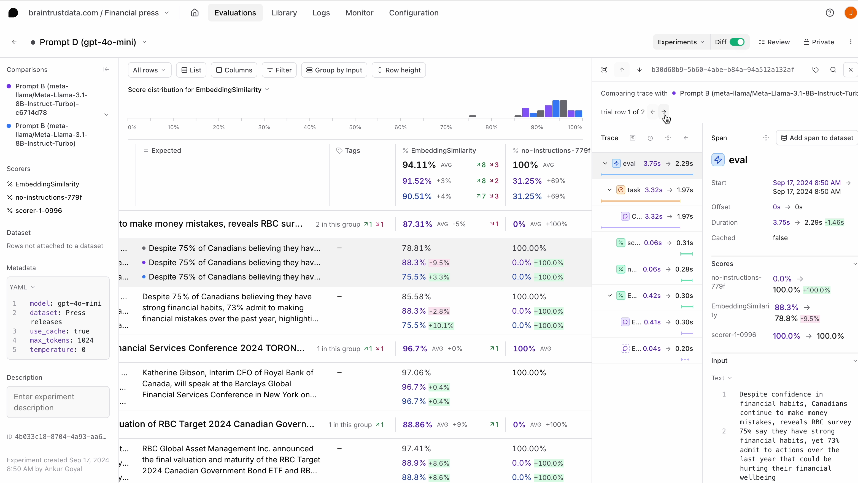
For example, an input that scores 1.0 in four trials and 0.0 in one has an 80% pass rate. The experiment comparison view shows the same per-trial spread across repeated runs.
Apply thresholds to aggregate results
For non-deterministic criteria, define merge conditions using aggregate score floors, pass rates, or allowed deltas from the baseline. A groundedness gate can fail when the mean score falls below the accepted minimum or regresses beyond a calibrated delta, without treating every wording change as a failure.
Release-critical conditions can remain stricter. A confirmed safety failure or invalid tool action may still block the pull request at the individual-case level even when the aggregate score passes.
Experiment results and trace retention
A failed pull request check is useful only when the developer can identify the affected test case and determine what changed. The Braintrust eval action links the pull request comment directly to the stored experiment, so investigations can start from the reported regression.
Each experiment is an immutable record of an evaluation run containing its inputs, outputs, scores, metadata, and associated traces. A later pull request run creates another experiment without overwriting the earlier result, so teams can return to previous comparisons and review the evidence behind a release decision.
Braintrust experiment comparison narrows the investigation to the cases affected by the change. Sorting by regressions surfaces the largest score decreases, and diff mode aligns the outputs, scores, and metadata from each experiment. The aggregate result shows where performance moved, and the case-level comparison shows which inputs produced the change.
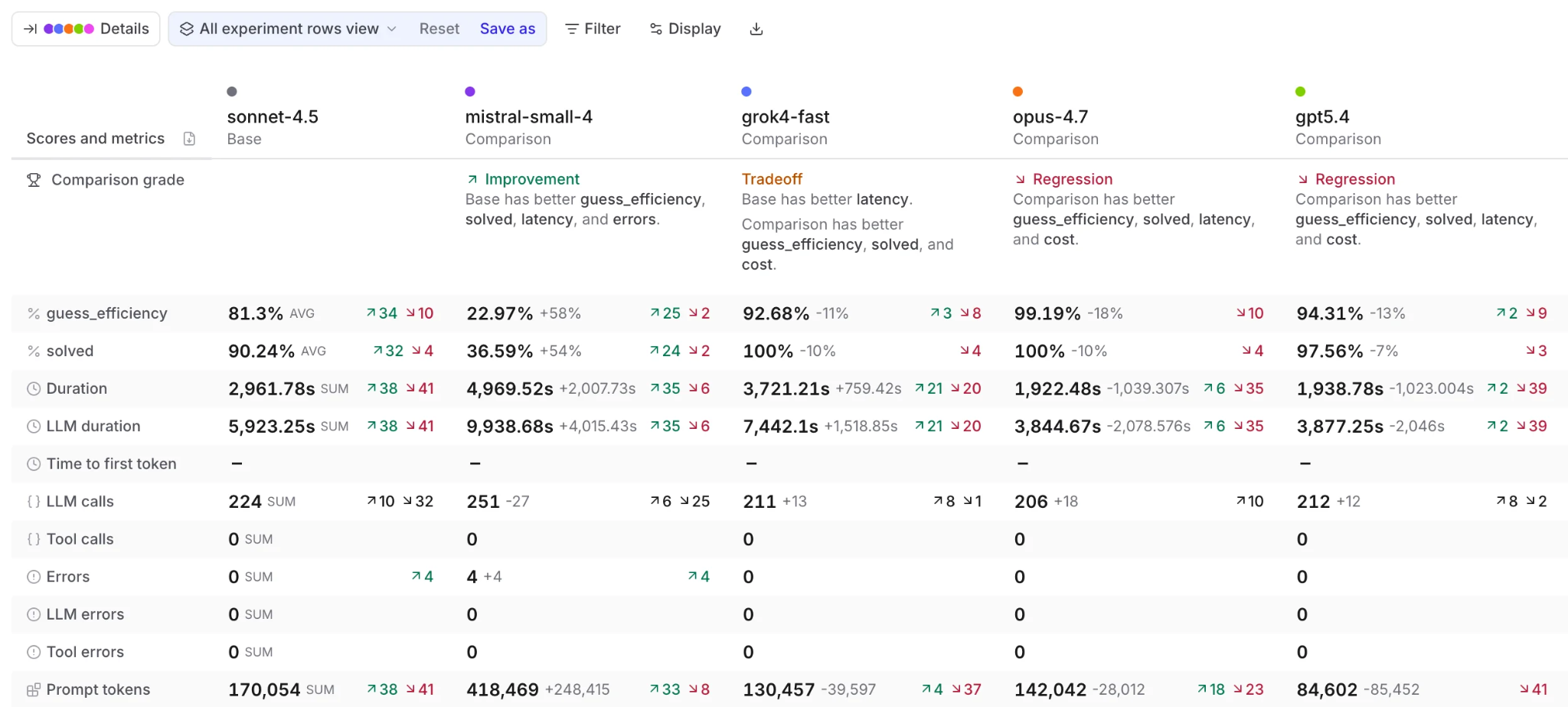
For multi-step applications, the trace attached to each experiment row provides the execution details behind the score. Braintrust can trace application logic so model calls, retrieval steps, tool calls, and other operations appear as separate spans with their inputs, outputs, and errors. Reviewing the failing span helps developers determine whether the regression came from a prompt, tool description, schema, retrieval result, or another application step.
Diff mode has a 4,096-character limit for each field, so long prompts and outputs may be truncated in the comparison. Store long values as structured objects with separate fields such as system_prompt, context, and user_query so Braintrust can compare each component independently. Structured fields preserve more useful diffs for RAG applications and long-context agents without changing the underlying trace.
Production failures as evaluation cases
A pull request gate can test only the behaviors represented in its dataset. Production traffic reveals inputs and failure patterns missing from the original test cases, so confirmed failures should become evaluation cases for future releases.
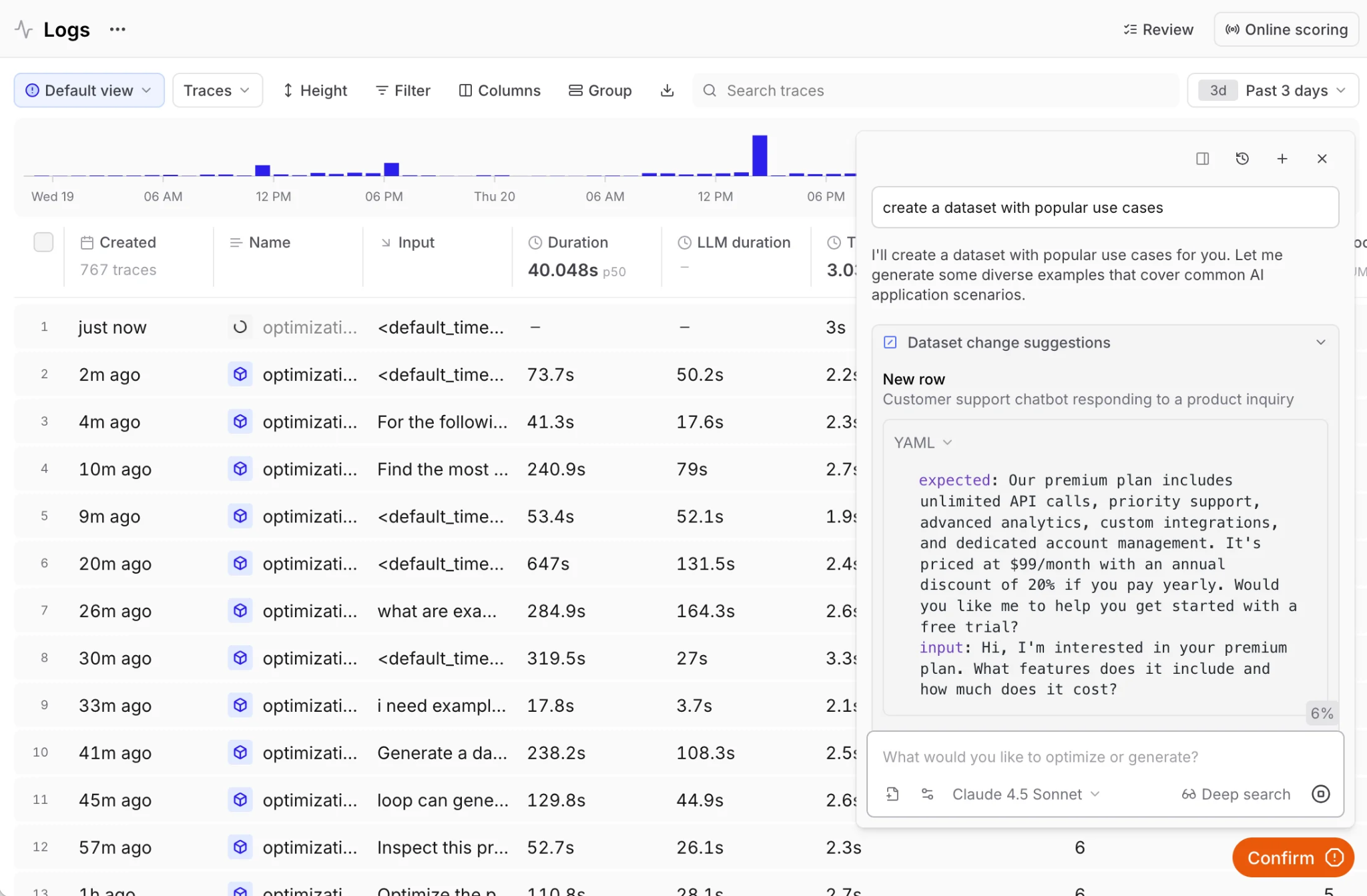
Braintrust datasets can receive cases from production logs, user feedback, traces, the SDK, Loop, or file uploads. Teams can promote selected traces manually or use dataset pipelines to add matching logs in bulk. Each case should include the input, approved expected behavior, and metadata linking it to the original incident.
Add the evaluation case in the same pull request as the fix so any future change that reproduces the failure will fail the CI check. Braintrust's dataset management controls preserve version history and snapshots, and Git metadata connects each experiment to the code version it evaluated. The guide to turning production failures into regression tests covers the promotion workflow in more detail.
Why teams use Braintrust for CI evaluation
Braintrust connects production evidence directly to release decisions. Engineering, product, and QA work from shared datasets, scorers, and experiment results, so agreed quality requirements can govern pull requests. When a production trace becomes a regression case, Braintrust preserves the connection between the failure, its fix, and the CI check that prevents it from returning.
Notion uses Braintrust to align 70 engineers on evaluation and deploy frontier models in under 24 hours of release. Teams at Stripe, Vercel, Instacart, Zapier, and Ramp also use Braintrust for production AI evaluation. The free Starter plan includes 1 GB of processed data and 10,000 scores per month, with unlimited users, projects, datasets, playgrounds, and experiments.
Start free with Braintrust to run evaluations in GitHub Actions and catch regressions before they merge.
Frequently asked questions about LLM eval pipelines in GitHub Actions
Should eval results block merges or only report?
Use blocking checks for criteria already accepted as release requirements and report-only checks for signals still being calibrated. A scorer is ready to block when its rubric is clear, its dataset covers meaningful failures, and repeated runs of unchanged code stay within the selected threshold. Braintrust custom reporters let one suite block on safety or core task failures while another remains advisory.
How large should a smoke dataset be?
About 20 high-signal cases is a practical starting point, but the final size should reflect the time budget for pull request checks. Measure the slowest cases with their configured trials and scorers, then retain the largest subset that completes within that budget. Prioritize failures that would stop a release and move lower-risk coverage to post-merge runs.
What does an eval pipeline cost per pull request?
The cost depends on the number of test cases, trials per case, token usage, model-based scorers, and CI runner charges. Estimate the task-model cost by multiplying cases by trials and average cost per call, then add any LLM judge calls. Deterministic scorers do not require additional model calls, and smaller smoke suites help keep pull request costs predictable.
Can an LLM eval pipeline run on self-hosted GitHub Actions runners?
A self-hosted runner can execute the pipeline when it supports the required action runtime, project dependencies, secrets, and outbound connections to Braintrust and the model provider. Braintrust Eval Action v2 requires a runner version compatible with Node 24 actions. Teams unable to update the GitHub action runtime can invoke bt eval directly from their existing CI job, as covered in the CI/CD documentation.
What is the difference between the agent testing layers and a CI eval pipeline?
The agent testing layers define the scope of testing across development, release, and production. A CI eval pipeline is the automated release check that runs regression cases for a proposed change, applies the agreed thresholds, and reports the result in GitHub. Development testing and production monitoring help determine which cases to add to future CI runs.